

Last updated: January 12th, 2025
If you’re an office worker (or you work from home), it’s likely that you’ve thought, “Is standing at work better than sitting?” Most of us spend 7-10 hours per day at a desk or a screen on average, so it’s crucial to know how to support our bodies.
This article will:
- Fully dissect the pros and cons of sitting and standing at work.
- Provide methods to overcome the potential downsides of each.
Whilst you may not have a career with a taxing physical load, you must be aware of your work environment’s impact on productivity and well-being.
Both sitting and standing come with their own drawbacks.
(Related: How High Should A Standing Desk Be?)
Is Sitting At Work Bad For You?
Sitting all day at work is tempting, especially to reserve energy and increase comfort.
Yet, research shows that people who sit for more than eight hours a day without physical activity are at risk of obesity. Other disadvantages to sitting at work include:
- Low blood circulation.
- Cardiovascular issues.
- Increased health risks, such as heart disease, cancers, and diabetes.
- Damage to the hips, back, and spinal discs.
- Sciatica.

Above: sitting in a slouched position all day is not ideal. Invest in a high-end ergonomic office chair, adjust it properly and pay attention to your posture.
Pros:
- Comfort during long workdays.
- Less foot pain.
Cons:
- Promotes a sedentary lifestyle.
- Stiff joints and muscles.
- Increased risk of cardiovascular issues.
- Increased risk of weight gain.
- Drowsiness and lowered focus.
Expert Tip.
Love using your office chair? Remember to change positions regularly and reduce the amount of time you spend crossing your legs.
Is Standing At Work Bad For You?
Many Australian workplaces now offer sit-stand desks, allowing you to create sitting-standing intervals throughout your workday.
This helps:
- Increase blood circulation by squeezing valves in the leg veins, pushing blood upward toward the heart.
- Improve bowel health by stretching the colon.
- Support your focus and productivity by preventing drowsiness. This study found that workers who use standing vs sitting desks can have as much as a 45% increase in their daily performance.
- Decrease the risk of postural problems with correct screen angles.
- Strengthen leg and core muscles (with proper stance), plus improve balance.
Unfortunately, standing does not alleviate all problems. There is ample evidence that prolonged standing at work can accelerate the onset of fatigue and lead to adverse health outcomes.
If you like to stand all day, be mindful of the following:
- Your leaning habits can place more stress on one side of the body (ensure that you stand balanced, with equal weight on each foot).
- Blood can pool in your lower extremities, causing or exacerbating varicose veins. You may need to wear compression stockings if you suffer from poor circulation.
- The amount of time you stand. Experts recommend standing 3 hours for every 1 hour you sit!
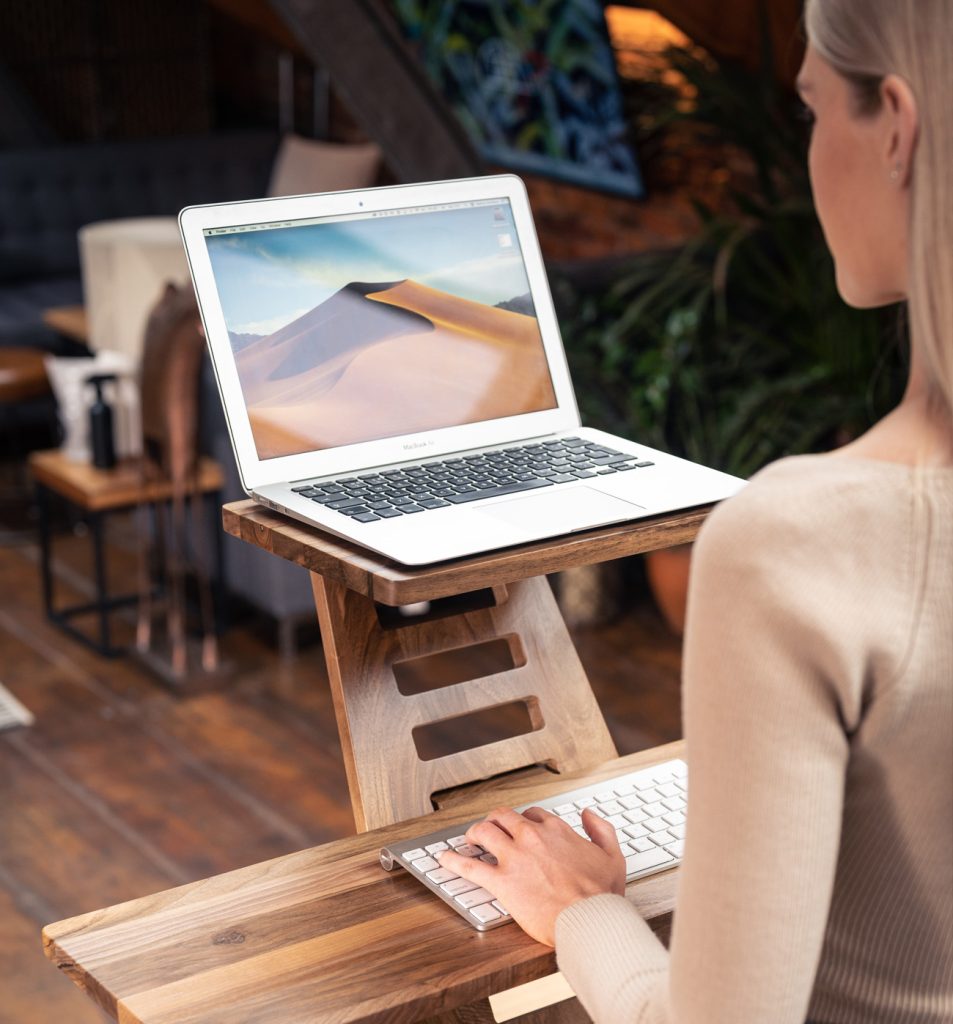
Above: adjustable standing desks are a relatively inexpensive and practical way of improving cognitive ability and increasing productivity.
Pros:
- Improved blood circulation.
- Stronger muscles (core, glutes, quads).
- Better diaphragmatic support and more profound breathing.
- Better bowel habits.
- Higher alertness and productivity.
- Additional calories burnt.
- Better posture and neck alignment.
Cons:
- Increased risk of developing or aggravating varicose veins.
- Additional strain placed on the hips, knees, and spine.
- Lower back and neck pain.
- Misalignment of joints if leaning incorrectly.
- Sore feet if not using standing mats or wearing adequate footwear.
(Related: Are Standing Desks Worth It?)
How To Avoid Injuries From Standing.
With proper knowledge, you can take action to mitigate the disadvantages of prolonged standing. Our tips:
- Switch between sitting and standing around every hour to increase blood flow. Use your phone or stopwatch to set sitting-standing intervals.
- Use a standing mat. Well-designed floor mats help alleviate pressure from hard surfaces such as concrete or tile. Discover our must-have desk accessories here.
Expert Tip.
Don’t switch from sitting to standing overnight. Professor Jack Callaghan from the University of Waterloo points out, “There is no question a sedentary lifestyle negatively impacts health. But you can’t just all of a sudden take away people’s chairs – because it’s going to cause pain.”
How To Avoid Injuries From Sitting.
For those who prefer to sit at work, there are many actions you can take to support your health.
- Implement an ergonomic setup! A comfortable workspace promotes good posture and health. Read our tips here.
- Increase your activity: Research shows that approximately one hour of physical activity daily can help counteract the effects of sitting too long. Consider finding a local gym near your office and booking 2-3 lunchtime sessions per week.
- Stretch: Consider adding mobility training into your daily routine. Work on joint movement and flexibility for as little as 10 minutes to see results (ideally before bed). You can find tips here.
Expert Tip.
Consider ways throughout the day that you can increase your activity. We love walking or biking to work (where possible) or taking the stairs instead of escalators.
How Many Calories Do I Burn By Standing?
One of the benefits of standing over sitting is increasing your daily metabolic rate, which is the number of calories you burn just by living! You can calculate your basal metabolic rate (BMR) here.
Researchers publishing in the Journal of Physical Activity and Health found the below:
- While sitting, subjects burned 80 calories/hour (the same when typing or watching TV).
- While standing, the number of calories burned was only slightly higher at 88 per hour.
- Walking burns 210 calories/hour.
An ideal day would incorporate sitting, standing, and walking on lunch breaks.
Bottom Line On Standing Versus Sitting At Work.
The results are in: neither sitting nor standing for prolonged periods is ideal for physical health. Instead, you must use a combination of both to support your muscles, improve your mobility, and increase your mental well-being.
In addition to using standing desks, you can support your body throughout the workday by:
- Using ergonomic chairs.
- Incorporating accessories like floor mats and additional monitors.
- Creating a welcoming, dedicated workspace.
Steven




Cody says:
Hi,
Do you know 9am HOME standing desks?
I want to know how about their desk.
Steven McConnell says:
Hi Cody, I’ve never seen them before but I took a quick look for you and I’m 90% certain it’s another Jiecang desk. You can tell by the design of the feet and the lowest height (60cm). Desky, Omnidesk, Stand Desk are all pretty much the same.
Cody says:
Which one do you mean? Pesk or Robin series? I am interested in their Robin series, it looks unique and beautiful. I can’t find anyone like it in Desky.
Steven McConnell says:
I was talking about the Pesk Series. Robin series does look attractive and unusual, but I’m usually not a fan of tubular legs as they tend to be more prone to wobble. I can’t say whether this is the case in this instance, as I haven’t physically tested the desk myself. The 10 year warranty is reassuring, however. I wish they offered a risk-free trial to let you test out the legs!
Cody says:
Thank you very much, Steven; I will take your comments into consideration.
Erin says:
Do you know much about Kangadesks? There are Australian as well.
Steven McConnell says:
Hi Erin, its another Jiecang standing desk. Same as Desky, Omni, Stand Desk etc. The design of the feet and 60-125cm height range gives it away. The desk appears to currently be currently on sale for $299, which is an absolute steal and I’m wondering why they’re selling their stock at 1/3 of RRP. Regardless, even if they’re about to go bust, I’d still buy one at that price.
EDIT: Be careful. Fakespot showed these warnings while browsing their website: “Multiple eCommerce scam experiences detected, Poor customer service”
Suzy says:
Hi – given all the desks are so similar, is it possible to mix a desk from one brand with a drawer accessory from another? I don’t like the UpDown desk metal drawer (hangs very low so likely to impede leg space) but don’t mind the Desky one – can these be mixed and matched?
Thank you for the reviews! Super helpful.
Steven McConnell says:
Yes, it’s possible to play switcheroo. But you may want to consider that UpDown design is curved, so it will hurt less if you do jam your thighs into it. Desky’s meanwhile, is quite angular. Pro tip: you can also find a bunch of inexpensive slimline desk drawers on Amazon.
jason says:
I’ve spent far, far too much time agonising over which desk to get haha, definitely more than a week. Very happy that you’ve added the omni-desk to your catalogue. That was the one I was considering the most untill you came you with a review saying that it was more wobbly!
Anyways, do you have an opinion on the new updown desk KLIK Series? Its advertises to be significanlty ligher while having better (on paper) specs
Thanks!
Evelyn says:
Hi Steven, great blog post – thank you! I’m also wondering whether you have any opinion or insights on the new UpDown Desk KLIK series…they come at $100 more expensive (for the same size/table top) but seem to be ‘better’ according to the UpDown website.
Cheers!
Steven McConnell says:
Hi Evelyn, thanks! I will have a full review of the KLIK up around February 2025. It’s not necessarily a better standing desk – but it is lighter, less bulky and promises easier assembly.
Ben Clements says:
Hi. I’m interested to know more about whether I actually could fit the Desky cable management system in the Omnidesk? I’ve had a look at the omnidesks in person at the showroom and it looks like their cable management trays screw on (vs the clip in at the edges of the desk with the Desky tray). The desky system also has the power plugs that snap into place in the tray.
So I’m curious to know if you have you tried it, and if so how did you do it please? Or is your thinking that you’d just buy the power boards and plugs from Desky and rest them in the Omnidesk tray?
I’m stuck, because I prefer the Omnidesks but I really love the idea of a single power lead!
Thanks
Steven McConnell says:
I just had a new Omnidesk delivered to my house. Give me about two weeks to assemble it, test it out and report back.
Sunni says:
Thanks for your very helpful (and funny) review. I used the information to to buy a Desky standing desk in record time – no consumer agonising for weeks, as is my usual practice. It has a pneumatic up/down mechanism, so lets see how that goes.
Steven McConnell says:
Ha! You’re welcome, Sunni. Glad I helped you cut down on the agonising. The pneumatic mechanism is an interest choice – let me know what you think of it?
Amber says:
Hi Steven,
Really great and insightful review. It was refreshing to see something that wasn’t filled with ChatGPT affiliate link garbage!
I’m curious about your opinion on L-shaped standing desks? I know that Desky, UpDown and a few other retailers offer these types of desks and I would assume they are more strong and stable, but I’m not an expert and I can also imagine the opposite being true due to the irregular shape. I’ve been looking at these types of desks because I think their shape suits my space the best. Do you have any knowledge on this or do you only have experience with regular rectangular shaped desks?
Steven McConnell says:
Thanks, Amber. Did you know that I have a L-shaped standing desk review? Search for “arielle best corner standing desks” and you’ll find it.
Melissa says:
Hi Steven great article thank you!
I’ve spent way to much time on this, and I’m now leaning towards the Artiss thanks to your review.
I’m wondering if you have any insight into ergonomic chairs for the home office also?
Steven McConnell says:
Hi Melissa, thanks! The Artiss is a great budget pick. I’ve written numerous ergonomic chair reviews – Google “arielle best ergonomic office chairs” to find them 🙂
tania says:
hey are there any other manual desks apart from the ikea ones you don’t recommend, that you would recommend? I prefer the idea of not needing electricity to move between stand up and sit down but maybe that doesn’t really exist?
Steven McConnell says:
Hey Tania, all of the premium brands (UpDown, Desky, etc) offer a manual crank model. Definitely the way to go if you want to avoid electronics. But TBH I suggest you reconsider. Electronics are very reliable these days – and hand-cranking your standing desk is more annoying than you’d expect.
Adam says:
Hi, do you know much about the UpDown Klik vs Pro system?
Steven McConnell says:
The company has shipped their new Klik standing desk to me yesterday. Stay tuned!
Scott Long says:
You mention in your review of the Up Down Pro that you would get the cable holes and grommets done, but it looks like your (very pretty) Messmate desk doesn’t have them. Is your recommendation a hindsight reflection, or did you choose not to spoil the look of the desk with the grommets? Without the grommets can you can still run the cables behind the desk and into the cable management tray? Cheers!
Steven McConnell says:
Scott, I said in the review that grommets and holes are a great idea, not that I have them. They’re less important if your standing desk faces a wall. But if you have an open-plan style home office like mine, they’ll make your workspace look much cleaner. PS You can still run cables into the tray without the holes and grommets – the cables will simply run behind the desk.
Isaac Jenkinson says:
Hello,
Have you had a chance to try the new UpDown Lyft model? Curious about its stability vs the pro.
Steven McConnell says:
Isaac,
Not yet. On first glance, it looks like a budget alternative to the “big brothers”. It’s probably pretty good (UpDown has a reputation to maintain), but I’m of the opinion that buying cheap means you pay more in the long term. I’d save up another few hundred bucks and get the Pro. You can often get a melamine or bamboo-topped model on sale for around $900.
David says:
This is a great site and will help me decide on which desk to buy. Have you heard any good/bad reviews about the Blacklyte Atlas Lite or Ergo-Rise II from BDO furniture?
Steven McConnell says:
David, thanks for the kind words. Never heard of the Atlas Lite until you mentioned it. Looks like a decent gaming desk that borrows heavily from Secretlab Magnus – but why not just buy a real Magnus instead?
As for the Ergo-Rise – looks like a decent desk, but its height controller is outdated. The best standing desk brands have upgraded to OLED controllers.
Ben says:
Thank you for writing this review Steven; really helpful to break through the BS.
By any chance have you used or hold an opinion on Vertilift desks?
Steven McConnell says:
You’re welcome. God, I haven’t even heard of them – but thanks for the heads-up. There are too many standing desks on the Australian market. Obviously I haven’t used these in person, but I’m almost certain they’re yet another Jiecang variant (i.e., frames are identical to Desky). You can tell by the identical max and min heights, as well as the design of the foot.
Eloise says:
Hey Steven, I was recommended the Alwyn or Octavia (Living Fusion) 140cm sit and stand desks from Temple and Webster which don’t even get a mention in your review. Would you bother with any of their brands ? (I may have dodged a bullet by finding your review!)
Steven McConnell says:
Hi Louise, I haven’t had first-hand experience with the T&W standing desk (must add one to my list!).
However, I had a look through the specs for you.
It doesn’t look too bad, actually – considering the price. If you can’t stretch your budget to ~$950 for an entry-level UpDown or Desky, this could be a good option.
Jordan says:
Hi Steven, Thanks for the review! I am starting out with a home office set up and need a new chair and sit stand desk. I’m a student but I prefer to buy things I know will last, but I don’t have too much experience with sit stand desks. I initially thought to buy the Artiss but have considered buying the Acacia UpDown Pro+ so I know it lasts and I don’t have to buy another desk in a couple of years. Is it worth the price jump for me? Thanks!
Steven McConnell says:
Hi Jordan, the Artiss and the UpDown desks sell at two very different price points. If you have the budget, I suggest you stretch to the UpDown standing desk – you won’t regret it.
jason says:
I know you’ve disqualified the flexispot e7 pro so the e7 max plus would probably also be disqualified, but a quad motor 4 column desk frame at a prices competitive with UpDown desk is incredibly tempting. Plus 15 year warrenty (if the company lasts that long)
Have you had a chance to take a look? Its like half the price of the desky quad!
Steven McConnell says:
Hey Jason, great observation. I haven’t included quad standing desks here because they’ve traditionally attracted a niche consumer – someone who needs to place a tonne of gear on the desktop and doesn’t mind paying 2X the usual price. But Flexispot’s sharp pricing on their quad desk certainly changes things. I haven’t seen one in the wild yet – but the specs look promising.
Steven
Goce says:
Do you have a list of best non standing desks? I never stand so I don’t see a reason to spend extra on electric motors etc.
Steven McConnell says:
Ha! That’s the best question so far. I don’t – do you think people want a guide on this?
Goce says:
I’m sure there are other people like me. I’d be interested in style and other than standing functionality offered by such a desk.